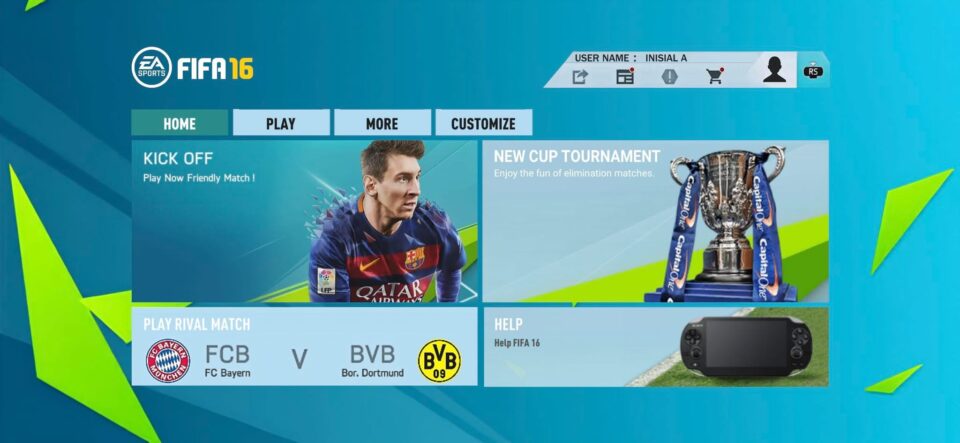
Looking for FIFA 16 Mod FC 26 Mobile with updated teams, kits, player faces, transfers and new football content? This community-made FIFA 16 Android mod package includes an APK + OBB archive, a large updated DATA package, a team and ratings database, and optional English commentary.
The supplied DATA package is labeled with FC 27, Career Mode V2, all tournaments, Manager Mode, new 26-27 kits, real faces and latest 26-27 transfers. The separate database file contains new teams, ratings and latest transfers. (MediaFire)
Important: This is a community-made FIFA 16 modification. It is not an official EA Sports FC 26 mobile release.
⚽ FIFA 16 Mod FC 26 Mobile Features
According to the supplied file names, this mod package includes:
- ⚽ Updated football teams
- 👕 New 26-27 kits
- 👤 Real player faces
- 🔄 Latest 26-27 transfers
- 🏆 Tournament modes
- 🧑💼 Manager Mode
- 🎮 Career Mode V2
- 📊 Updated teams and player ratings
- 🎙️ Optional English commentary
- 📱 Android gameplay
- 🆕 FC 26/FC 27 community update content
The exact features available can depend on how the supplied APK, OBB and DATA files are installed together.
📦 File Information
🎮 APK + OBB
File: APK+OBB NEW UPDATE BY MPROGAMING.COM.zip
Size: 1.47 GB
Format: ZIP Archive (MediaFire)
📂 Full DATA — Part 1
File: DATA FULL FC 27 PART 1 CAREER MODE V2 UPDATE ALL TOURNAMENTS MODE MANAGER MODE UPDATE NEW KITS 26-27 REAL FACES AND LATEST TRANSFERS 26-27 BY MPROGAMING.COM.zip
Size: 7.64 GB
Format: ZIP Archive (MediaFire)
📊 Team Kit & Ratings Database
File: DATA DB FC 27 V2 NEW TEAMS & RATINGS LATEST TRANSFERS 26-27 BY MPROGAMING.COM.zip
Size: 7.42 MB
Format: ZIP Archive (ModsFire)
🎙️ English Commentary
File: ENGLISH COMMENTARY BY M PRO GAMING.zip
Size: 384.44 MB
Format: ZIP Archive (MediaFire)
💾 Total Download Size
The four supplied archives total approximately 9.50 GB before extraction.
Because the files also need to be extracted, make sure your phone has substantially more free storage than the download total before starting the installation.
📱 How to Install FIFA 16 Mod FC 26 Mobile
Step 1 — Download the Required Files
Download the APK + OBB package and the Full DATA package first.
The Team Kit & Ratings database and English Commentary are additional files that can be installed after the main game setup.
Step 2 — Use ZArchiver
Install and open ZArchiver on your Android phone.
Go to:
Internal Storage/Download
Locate the downloaded ZIP archives.
Step 3 — Extract APK + OBB
Find:
APK+OBB NEW UPDATE BY MPROGAMING.COM.zip
Tap the file and choose Extract here.
Wait for the extraction to finish.
Open the extracted folder and identify the APK and OBB files/folders included in the package.
Step 4 — Install the APK
If an APK is included, tap it and install it.
If Android asks for permission to install apps from that source, only enable the permission if you trust the file and understand the risks.
Do not open the game yet.
Step 5 — Locate the OBB
If the extracted package contains an OBB folder/file, place the OBB according to the normal Android structure:
Internal Storage/Android/obb/
If the package already contains a folder named com…, move that complete folder into:
Android/obb/
Do not randomly rename the folder because the game’s package name must match its OBB location.
Step 6 — Extract the Full DATA
Find:
DATA FULL FC 27 PART 1 CAREER MODE V2 UPDATE ALL TOURNAMENTS MODE MANAGER MODE UPDATE NEW KITS 26-27 REAL FACES AND LATEST TRANSFERS 26-27 BY MPROGAMING.COM.zip
This archive is 7.64 GB, so extraction can take a while. (MediaFire)
Tap → Extract here.
Because of the large size, make sure your phone has enough free storage before starting.
Step 7 — Move the DATA Folder
After extraction, check the folder structure.
If the package contains a game’s data folder, it normally belongs under:
Internal Storage/Android/data/
Follow the folder structure supplied inside the archive and avoid renaming the game’s package folder.
Step 8 — Install the Team & Ratings Database
Download and extract:
DATA DB FC 27 V2 NEW TEAMS & RATINGS LATEST TRANSFERS 26-27 BY MPROGAMING.COM.zip
The archive is listed at 7.42 MB. (ModsFire)
Copy its files to the location indicated by the package’s folder structure.
This database is described as containing new teams, ratings and latest transfers. (ModsFire)
Step 9 — Install English Commentary
Extract:
ENGLISH COMMENTARY BY M PRO GAMING.zip
The archive is 384.44 MB. (MediaFire)
Copy the extracted commentary files into the appropriate game folder, following the folders included in the archive.
Do not rename commentary files unless the package instructions specifically require it.
Step 10 — Launch the Game
Once the APK, OBB, DATA and optional update files have been placed correctly, launch the game.
Allow the game a little time on its first startup while it loads the installed files.
⚠️ Android 13/14/15 Storage Note
Modern Android versions can restrict direct access to some folders inside Android/data and Android/obb.
If ZArchiver cannot access a required folder, use Android’s folder-access permission system when prompted rather than repeatedly trying to bypass the restriction.
📢 Download Notice
An advertisement or pop-up may appear when you click a download button. Simply close or cancel the advertisement and continue to your intended download destination.
MediaFire explicitly states that its download button can show an advertiser message in a new window. (MediaFire)
The ModsFire page also uses a multi-step manual download process for the team/rating database. (ModsFire)
⚙️ Performance & Storage Tips
Because this package contains several large archives:
- Keep plenty of free internal storage.
- Extract the files one at a time if storage is limited.
- Close background apps before launching the game.
- Avoid screen recording if your phone struggles with performance.
- Lower graphics settings if you experience frame drops.
- Keep the original ZIP files until you confirm the installation works.
- Delete the archives afterward only if you need to recover storage.
❓ Frequently Asked Questions
Is this the official FC 26 mobile game?
No. It is a community-made modification based on FIFA 16. The supplied files contain FC 26/FC 27-style update content and are not an official EA release.
How large is the APK + OBB package?
The ZIP archive is 1.47 GB. (MediaFire)
How large is the DATA file?
The Full DATA Part 1 archive is 7.64 GB. (MediaFire)
Is English commentary included?
Yes, there is a separate English Commentary by M Pro Gaming ZIP archive listed at 384.44 MB. (MediaFire)
What does the team and ratings file contain?
Its filename identifies it as a database containing new teams, ratings and latest transfers for 26-27. (ModsFire)
Do I need every file?
For the complete setup described here, use the APK + OBB and Full DATA packages. The team/rating database and English commentary are additional update components.
⚠️ Disclaimer
This is a community-made FIFA 16 modification and is not affiliated with or endorsed by EA Sports. The FC 26/FC 27 features described above are based on the supplied file names and hosting pages. File contents, compatibility and installation requirements can change between mod releases. Download and install files at your own discretion.
💾 Make sure you have plenty of free storage before extracting
