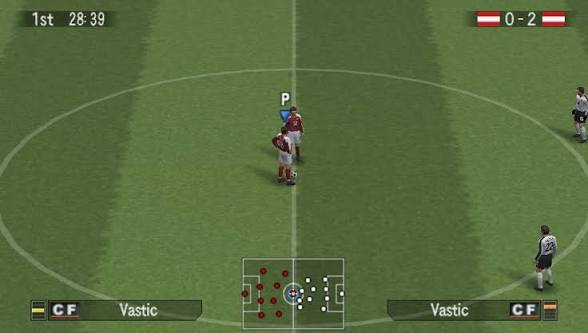
Looking for Winning Eleven 2026 PPSSPP for Android? This community-made football package comes with the main Winning Eleven PSP game file, a separate Camera Pack, and Textures + Save Data.
The supplied files are named WINING ELEVEN 2025 PSP GAME FILE.zip, WINING ELEVEN 2025 PSP CAMERA PACK.zip, and WINING ELEVEN 2025 PSP TEXTURES + SAVE DATA.zip. So while this setup is presented here as a Winning Eleven 2026 update, the actual supplied filenames refer to the 2025 PSP files. (MediaFire)
Note: This is a community-made PSP/PPSSPP football update and is not an official Konami release.
⚽ Winning Eleven 2026 PPSSPP Features
- 🎮 PSP/PPSSPP football gameplay
- ⚽ Updated Winning Eleven experience
- 🎨 Separate textures
- 💾 Save Data included
- 📷 Optional Camera Pack
- 📱 Android PPSSPP support
- 📦 Easy ZIP-based setup
📦 File Information
Main Game: WINING ELEVEN 2025 PSP GAME FILE.zip
Size: 675.01 MB
Format: ZIP archive (MediaFire)
Camera Pack: WINING ELEVEN 2025 PSP CAMERA PACK.zip
Size: 3.38 MB
Format: ZIP archive (MediaFire)
Textures + Save Data: WINING ELEVEN 2025 PSP TEXTURES + SAVE DATA.zip
Size: 556.89 MB
Format: ZIP archive (MediaFire)
📱 Full Installation Guide Using ZArchiver
Step 1 — Download All Files
Download the Game, Camera Pack, and Textures + Save Data files from the download section below.
Make sure you have enough free storage because the three ZIP files total approximately 1.21 GB before extraction.
Step 2 — Open ZArchiver
Install and open ZArchiver on your Android phone.
Go to the folder where your browser saves downloaded files, usually:
Internal Storage/Download
You should see the three ZIP files.
Step 3 — Extract the Main Game
Find:
WINING ELEVEN 2025 PSP GAME FILE.zip
Tap the ZIP file and select Extract here.
Wait until the extraction finishes.
Look inside the extracted folder for the PSP game file, normally an .iso file.
Step 4 — Move the ISO
Create or use a folder for your PPSSPP games, for example:
Internal Storage/PSP/ISO
Move the extracted Winning Eleven ISO into that folder.
You don’t need to extract an ISO again. The .iso file is the game file PPSSPP reads.
Step 5 — Extract Textures + Save Data
Find:
WINING ELEVEN 2025 PSP TEXTURES + SAVE DATA.zip
Tap it → Extract here.
Open the extracted folder and check the folders inside.
If you see folders such as TEXTURES or SAVEDATA, keep their structure intact.
Step 6 — Install the Save Data
If the package contains a SAVEDATA folder, copy the contents to the appropriate PPSSPP savedata location.
A common location is:
Internal Storage/PSP/SAVEDATA
However, follow the folder structure supplied inside the package if it uses a different structure.
Step 7 — Install the Textures
If the package contains a PPSSPP texture folder, place it in the corresponding PPSSPP texture directory.
Do not rename folders unnecessarily because PPSSPP texture replacement relies on the correct folder structure.
Step 8 — Install the Camera Pack
Find:
WINING ELEVEN 2025 PSP CAMERA PACK.zip
Tap → Extract here.
Check the extracted files and copy them according to the folder structure included in the Camera Pack.
The Camera Pack is only 3.38 MB, so it should extract quickly. (MediaFire)
Step 9 — Open PPSSPP
Launch PPSSPP.
Navigate to the folder containing your Winning Eleven ISO and tap the game.
If everything was copied correctly, the game should start with the installed update files.
Step 10 — If Textures Don’t Appear
If the game launches but the new textures aren’t visible:
- Open PPSSPP Settings.
- Go to the texture replacement/development settings.
- Make sure texture replacement is enabled if required by the package.
- Close and restart the game.
- Check that the texture folder is in the correct location.
📢 Download Notice
An advertisement or pop-up may appear when you tap a download button. Don’t worry. Simply close or cancel the advertisement and continue to your intended download destination.
MediaFire states that its download button can show an advertiser message in a new window. (MediaFire)
⚙️ Performance Tips
For smoother Winning Eleven PPSSPP gameplay:
- Close unnecessary background apps.
- Use a suitable rendering resolution.
- Lower the resolution if you experience lag.
- Disable demanding graphical enhancements if necessary.
- Avoid heavy screen recording on lower-powered phones.
- Keep enough free storage for extraction.
❓ Frequently Asked Questions
Is this an official Winning Eleven 2026 release?
No. This is a community-made PPSSPP football update. The supplied files themselves are named Winning Eleven 2025, so the 2026 title refers to the update/package being shared rather than an official 2026 release. (MediaFire)
Do I need all three files?
For the complete setup described here, download the main game, Textures + Save Data, and Camera Pack.
How large is the game?
The main ZIP is 675.01 MB. (MediaFire)
How large is the Textures + Save Data?
The archive is 556.89 MB. (MediaFire)
How large is the Camera Pack?
The Camera Pack is 3.38 MB. (MediaFire)
Can I play it on Android?
The files are intended for use with PPSSPP on Android, but actual performance depends on your phone and PPSSPP settings.
⚠️ Disclaimer
This is a community-made football gaming package and is not affiliated with or endorsed by Konami. File contents and compatibility can vary between community releases. Always scan downloaded files and install them at your own discretion.
